
The company didn’t have a lead problem. People found them, liked what they saw and booked a call. Then a share of those calls never happened. Someone canceled, someone forgot, someone didn’t show, and nobody followed up.
This is the story of the no-show follow-up automation I built to fix that, for a SaaS company that serves interior designers and architects. Zapier later featured the build on its blog. Three months after launch:
+60% revenue · 1–2 hours saved every day · 0 new hires
Below is the problem, the five-step system, the results, and how to apply the same pattern to your own stack.
The problem: booked calls that quietly disappeared
On paper, the sales process looked fine. Leads came in from Google Ads and other channels, and they booked calls through Calendly. But everything after the booking was manual, and most of it didn’t happen.
Here’s what the setup looked like before:
- Calendly wasn’t connected to the CRM. A booking, a cancellation or a Calendly no-show lived in one tool and never reached the place where the team managed deals.
- Missed and canceled meetings got no follow-up. If a lead didn’t show, the lead was simply gone.
- Google Ads conversions weren’t tracked. The team paid for clicks but couldn’t see which ones turned into booked calls, let alone revenue.
- Reminders and notes were manual. Someone had to remember to send them, and on busy days nobody did.
The result was the worst kind of leak: invisible. As I told Zapier when they wrote up the project:
“They didn’t have any automation in place. Even when someone booked a call, there was no structure to make sure that lead turned into a customer.”
Put more simply: “They were leaving money on the table.”
Why no-shows are a pipeline problem, not a calendar problem
Most advice on how to reduce no shows stops at reminders: send a confirmation email, add a text the day before, ask people to put it in their calendar. Reminders help. But they treat a no-show as a scheduling glitch.
It isn’t. A lead who booked a call already raised their hand. You paid to get them there, through ads, content or outreach. When they miss the call, the interest doesn’t disappear on the spot. It fades over the next hours and days while nobody reaches out.
So the real question isn’t “how do we stop people missing calls?” It’s “what happens in the first hour after they do?” If the answer is “nothing, unless someone remembers”, you don’t have a calendar problem. You have a follow-up problem. And follow-up is something you can automate.
That’s the core of how I work: your leads usually aren’t the problem. Your follow-up is.
The system: booking → log → CRM → follow-up → alert
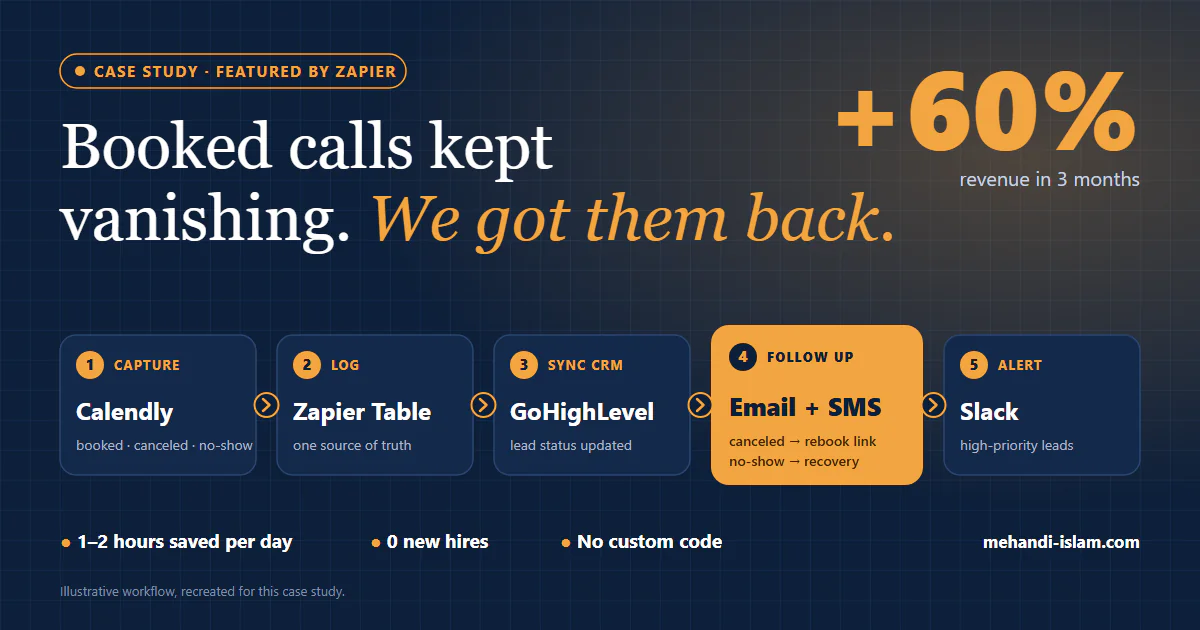
The build used tools the team already had or could adopt cheaply: Calendly, Zapier, Zapier Tables, GoHighLevel and Slack. No custom code. Here is how the five steps fit together (the diagram at the top of this post shows the full flow).
1. Capture every booking event
Every Calendly event goes to Zapier: new bookings, cancellations and no-shows. This Calendly–Zapier connection is the foundation. If an event isn’t captured, nothing downstream can act on it.
2. Log it in one place
Each event is written to a central Zapier Table. That table becomes the single source of truth for every meeting: who booked, when, and what happened. Before, nobody could say how many calls were falling through. Now there’s one place to look.
3. Update the CRM automatically
The meeting status from the table updates the lead in GoHighLevel. Sales sees the true state of every lead (booked, canceled or no-show) without anyone copying data between tools.
4. Follow up by status
This is where the money comes back. The status decides what the lead receives:
- Canceled: a prompt to rebook, so the lead can pick a new time while they’re still interested.
- No-show: a recovery sequence over email and SMS, starting within the first hour after the missed call.
Each no-show follow-up email is short and asks for one thing: a new time. Here’s an example of the shape such a message takes:
Subject: Missed you today, want to pick another time?
Hi {first name}, looks like we missed each other for today’s call. No problem, these things happen. You can grab a new slot here: {booking link}. If the timing isn’t right anymore, just reply and let me know.
Example template written for this post, not the client’s actual message.
5. Alert the team when it matters
Not every lead needs a human right away, but some do. High-priority leads trigger a Slack notification, so the team can step in personally instead of leaving it to the sequence.
What changed: the results after three months
| Before | After |
|---|---|
| Missed and canceled calls got no follow-up | Every missed or canceled call is re-engaged automatically |
| No visibility into how many meetings fell through | Every lead and meeting status visible in one table and the CRM |
| Manual reminders and notes | 1–2 hours saved per day on manual tasks |
| Calendly disconnected from the CRM | Calendly, Zapier, GoHighLevel and Slack working as one system |
| Growth would have meant hiring | 0 new hires, no custom code |
The headline number: revenue grew 60% in three months.
Revenue came from deals that were already in the pipeline but slipping out unnoticed. As I told Zapier:
“Before, they had no idea how many meetings were falling through. Now they can see every lead and take action automatically.”
And the line that sums it up: “They’re closing deals they didn’t even know they were losing.”
Why it kept working: SOPs, training and 90 days of support
A lot of automation projects work on launch day and break a month later, because only the person who built them understands them. I didn’t want that here.
The handover included:
- An SOP and documentation for every workflow, so the team knows what each Zap does and why.
- Training videos, so new team members can learn the system without a live walkthrough.
- 90 days of post-launch support, to catch edge cases and adjust as real data came in.
We also laid the groundwork for new lead sources, like Instagram DMs and LinkedIn, to plug into the same system later. The goal is a system the team owns and understands. Yours, not rented.
How to apply this to your own stack
You don’t need this exact stack. The pattern carries across tools:
- Booking tool: Calendly, or any scheduler that sends booked, canceled and no-show events.
- Automation platform: Zapier here. n8n or Make work too. (I compare them in a separate guide.)
- CRM: GoHighLevel here. HubSpot, Close, Pipedrive or Zoho work the same way.
- Channels: email and SMS for the lead, Slack (or Teams) for your team.
Before you build anything, run these five checks on your own booking flow:
- Do you know your no-show count for last month? If not, step 2 (one central log) comes first.
- Does a no-show change anything in your CRM? If the lead still says “meeting booked”, sales is working from bad data.
- What does a no-show receive in the first hour? If the answer is “nothing”, that’s your biggest leak.
- Does a cancellation get a rebook link automatically? Someone who canceled is often still interested in a different time.
- Does anyone get told when a high-value lead misses a call? Some leads deserve a personal follow-up, not just a sequence.
If you answered “no” or “not sure” to two or more, your no-show follow-up automation is probably costing you deals you’ll never see in a report.
FAQ
Can you automate no-show follow-ups without a developer?
Yes. This build used Calendly, Zapier, Zapier Tables, GoHighLevel and Slack, with no custom code. Most booking tools and CRMs expose the events you need through no-code automation platforms.
Which tools do you need for no-show follow-up automation?
Four pieces: a booking tool that reports no-shows and cancellations, an automation platform (Zapier, n8n or Make), a CRM to hold the lead’s status, and a channel to reach the lead (email, SMS or both). A team alert channel like Slack is optional but useful for high-value leads.
Does this work with HubSpot or Close instead of GoHighLevel?
Yes. The pattern is the same: capture the event, log it, update the CRM status, follow up by status and alert the team. Only the CRM step changes.
How soon should you follow up after a no-show?
In this build, the follow-up started within the first hour. The point is to reach the lead while the booking is still fresh, with one clear ask: pick a new time.
Find out where your booked calls leak
If calls are slipping through your calendar, I’ll find where. In a free 30-minute Revenue Leak Audit, we look at your booking-to-deal flow and pinpoint the gaps costing you the most.