
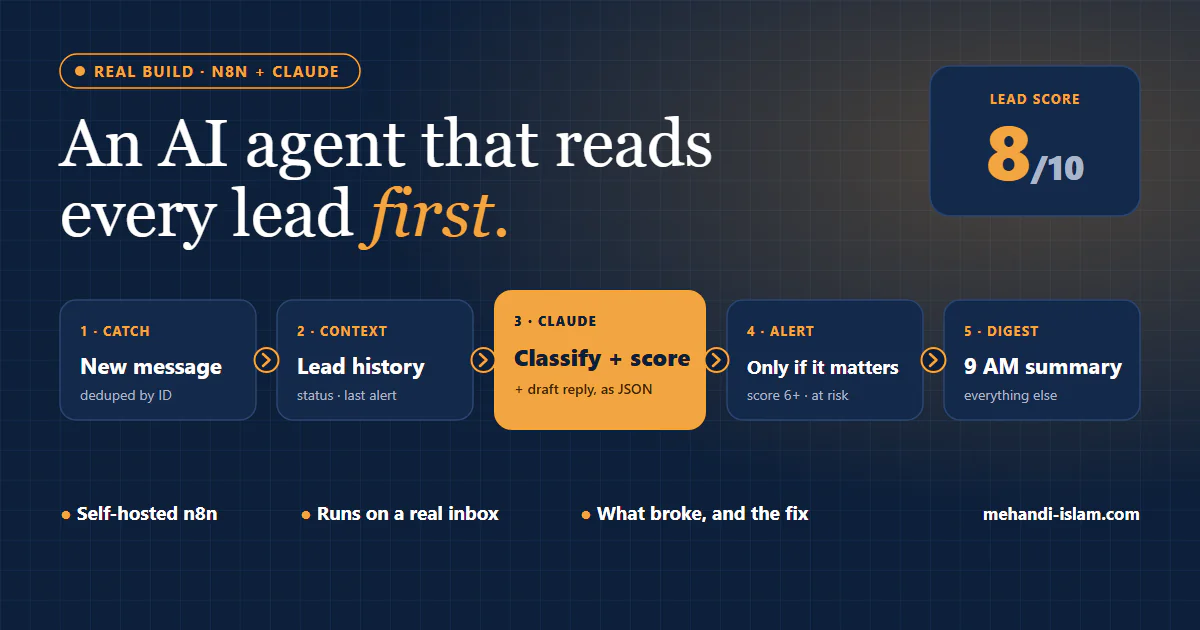
Most small teams don’t lose leads because nobody replies. They lose them because the wrong messages get answered first. A new prospect with a real project waits behind a client asking a quick question, a spam message and three “thanks!” replies. I fixed that with an n8n AI agent.
I had the same problem with my own lead inbox on a freelance marketplace, so I built an n8n AI agent to triage it. Every new message is read, checked against the contact’s history, classified, scored from 1 to 10 and given a draft reply. Only the messages that matter interrupt me; everything else waits for a morning digest. It runs on my self-hosted n8n, with Claude doing the reading.
n8n has since approved this workflow as a public template, so you can import it for free: Draft Fiverr buyer replies and follow-up digests with Claude and Gmail.
This post walks through the build, the decisions behind it and what broke in production.
What the n8n AI agent does
- Catches every new message the moment the notification email arrives.
- Skips anything it has already seen, so a message is never processed twice.
- Loads the contact’s history: earlier messages, current status and last alert.
- Classifies the message as a new lead, an active lead, an active client, at risk, small talk or spam.
- Scores it from 1 to 10 for how much it needs my attention.
- Drafts a reply in my voice, ready to edit.
- Saves everything to n8n data tables: one row per contact, one per message.
- Alerts me only when it matters. Everything else goes into a 9 AM digest.
Do you need n8n’s AI Agent node?
Not always, and that’s the first decision worth getting right.
n8n’s AI Agent node is built for open-ended work: the model decides which tools to call (search the CRM, look up a calendar, call an API), keeps memory across turns and loops until it’s done. That’s powerful, and it’s also slower, harder to test and less predictable.
Lead qualification is usually not open-ended. You know the inputs (the message and the history) and the output you want (a category, a score and a draft). For that, a single model call that returns structured JSON is easier to debug and cheaper to run. My agent works this way: n8n handles the steps and the data, and Claude does one well-defined job per message.
My rule of thumb: start with one structured call. Move to the AI Agent node with tools when the model genuinely needs to look things up or take actions you can’t predict in advance.
How to build the n8n AI agent, step by step
1. Trigger and parse
The trigger watches for the marketplace’s “new message” notification emails. A parse step pulls out the sender, the message text and a link back to the conversation.
2. Skip duplicates
Each email has a unique ID. Before anything else, the workflow checks the messages table for that ID and stops if it’s already there. Without this, a retry or a reprocessed email would trigger a second alert.
3. Load the contact’s history
The workflow looks up the contact in the leads table. Is this someone new? An active client? Someone who went quiet? The model gets that context along with the message, which is what lets it tell “Can we jump on a call?” from a new lead apart from the same words from a client mid-project.
4. Classify, score and draft
One call to Claude with a strict prompt and a JSON output: the category, a score from 1 to 10, a one-line reason, whether a reply is needed, and a draft reply. The prompt includes my rules for tone, what I never promise in writing and how I like to suggest a call.
5. Safety checks before anything reaches me
A small code step checks the draft against the platform’s messaging rules and cleans it up before it’s saved. A model will sometimes write something that’s fine in an email but not allowed on a marketplace, and it’s cheaper to catch that in code than to rely on the prompt alone.
6. Save, then decide who gets interrupted
The contact row is updated (status, score, last message) and the message is logged. Then the alert rules run (more on those below), and if the message qualifies, the draft lands in my inbox with the reason and a link to reply.
7. The morning digest
A second workflow runs at 9 AM. It lists contacts at risk, anyone who has gone quiet for two days or more, new contacts from the last 24 hours, and the messages held back from instant alerts. If there’s nothing to report, it sends nothing.
What broke when the n8n AI agent went into production (and the fix)
On day one, every live message came through blank.
The parser read the plain-text version of the notification email. In testing that worked. In production, the notification emails turned out to have only an HTML body, so the text field was empty and the model was classifying nothing. The fix was to parse the HTML and to pull the sender’s username from the inbox link rather than from the display text.
The second issue was duplicates. The same person showed up as separate contacts because their name was written differently in different emails (dots, underscores and dashes). Matching contacts on a normalised key (lowercase, with those characters treated as the same) merged them, and the digest now merges any duplicates it finds.
Neither problem showed up in testing with sample messages. Both were obvious within hours on real ones. Test with real data as early as you can.
Alert rules that keep the n8n AI agent useful
An AI agent that alerts on everything is just a noisier inbox. The rules that made mine useful:
- Alert right away only if the contact is at risk, the score is 6 or more, or it’s a new contact with a written message.
- At most one alert per contact every 6 hours, so a back-and-forth conversation doesn’t ping me ten times.
- Everything else is held and listed in the morning digest.
- Empty or attachment-only messages skip the model entirely, which saves cost and noise.
These thresholds came from a week of use, not from theory. Expect to tune yours.
Applying this to your own leads
The same pattern works for most inbound channels:
- Web forms: trigger on the form webhook; the history lookup becomes a CRM search by email.
- A shared sales inbox: trigger on new email; classify existing customers versus new enquiries.
- Chat or DMs: trigger on the platform’s webhook, if it has one.
- Your CRM: write the category, score and reason to the contact record, so reps see why a lead was flagged.
Keep the three parts that matter most: the history lookup, the structured output and the alert rules. The model is the easy part.
FAQ
Can n8n build AI agents without code?
Mostly. The trigger, data tables, model call and alerts are all standard nodes. I use small code steps for parsing and cleaning, which is common in n8n and doesn’t require a developer for simple cases.
Which model should I use for lead qualification?
One that reliably follows a JSON format and writes well in your voice. I use Claude for this agent. Test two or three on a batch of your real past messages before deciding.
Should the agent reply to leads automatically?
I’d start with drafts that a person approves. Once you trust the categories and the tone, you can automate the safest cases, like acknowledging a new enquiry.
How much does it cost to run?
On self-hosted n8n there’s no per-run fee from n8n, so the main cost is the model call per message, and skipping empty messages keeps that down. If you’re weighing n8n against Zapier for this, I compare the pricing models in n8n vs Zapier for sales teams.
Want an agent like this on your pipeline?
I build AI agents for sales ops that qualify leads, draft replies and flag what matters, in your accounts and handed over with SOPs. See how I build them, or start with a free 30-minute leak audit.